> ## Documentation Index
> Fetch the complete documentation index at: https://docs.aiinsurance.io/llms.txt
> Use this file to discover all available pages before exploring further.
# Underwriting Workbench
## Overview
The Underwriting Workbench is a tool that allows you to review and manage changes made to individual insureds during policy-related processes, when creating new submissions, and when creating new quotes. It provides detailed breakdowns of premium changes, helping you understand the impact of modifications before finalizing them.
## Accessing the Underwriting Workbench
The Underwriting Workbench is available in multiple workflows:
1. **Policy Processes**: When working with policies (endorsements, renewals, or other policy modifications)
2. **Submission Creation**: When creating a new submission
3. **Quote Creation**: When creating a new quote
4. Navigate through the workflow and **Expand the Underwriting Workbench** section to view it
5. The workbench will display detailed breakdowns of premium changes for each insured
xd
When collapsed, the Underwriting Workbench shows a snapshot of the details. Expand it to view all detailed breakdowns and premium information.
## Main Components
### 1. Loss History Tile
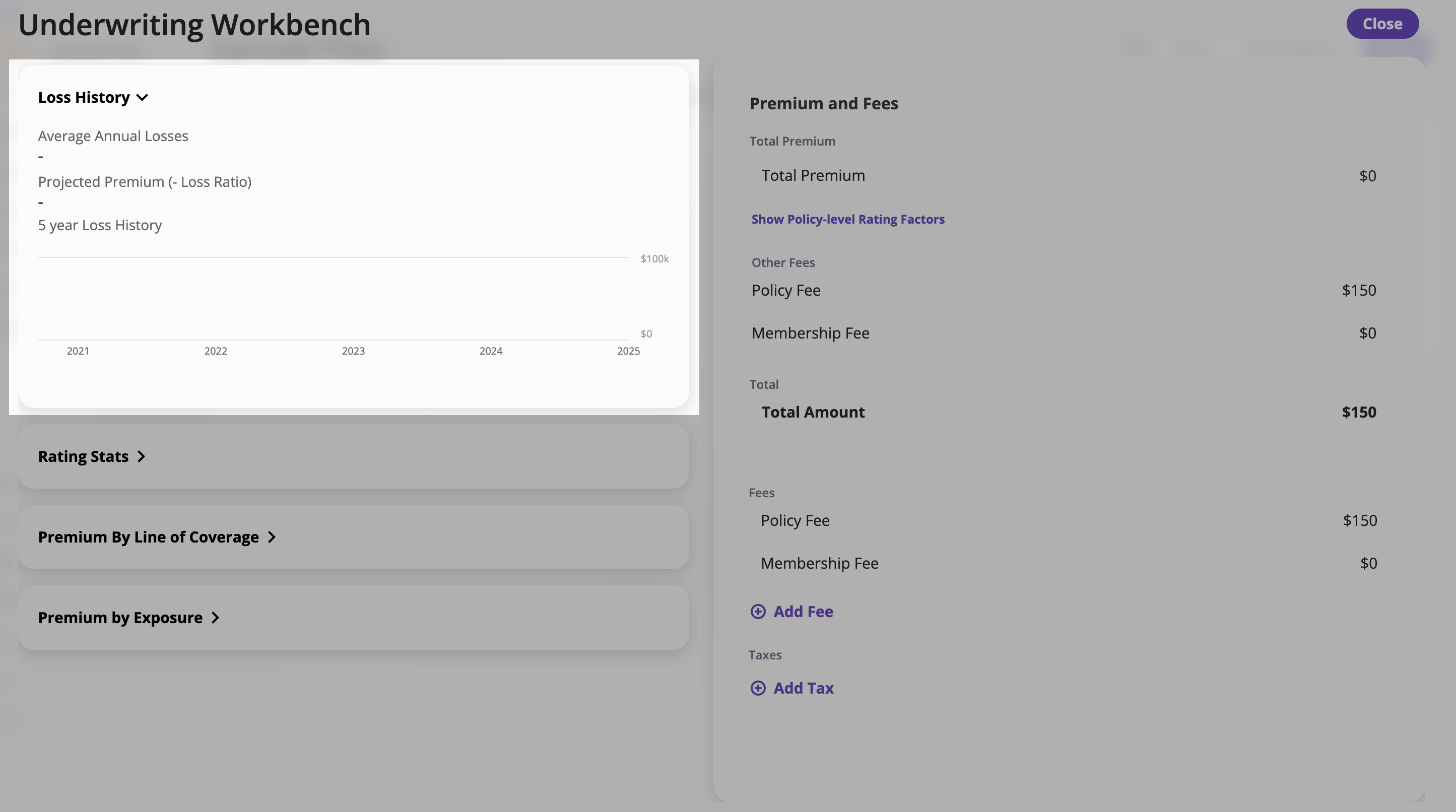
Displays **historical losses**, a **Loss Pick** calculation, and **projected premium** based on your goal loss ratio.
#### What It Shows
* **Average Annual Losses**: Developed and deductible-adjusted average across year windows (see calculation below)
* **Projected Premium (Goal Loss Ratio)**: Premium projection (e.g., at 50% Loss Ratio)
* **5-Year Loss History**: Graph of losses over time\\
 #### Data Sources
The Loss Pick calculation draws from three inputs:
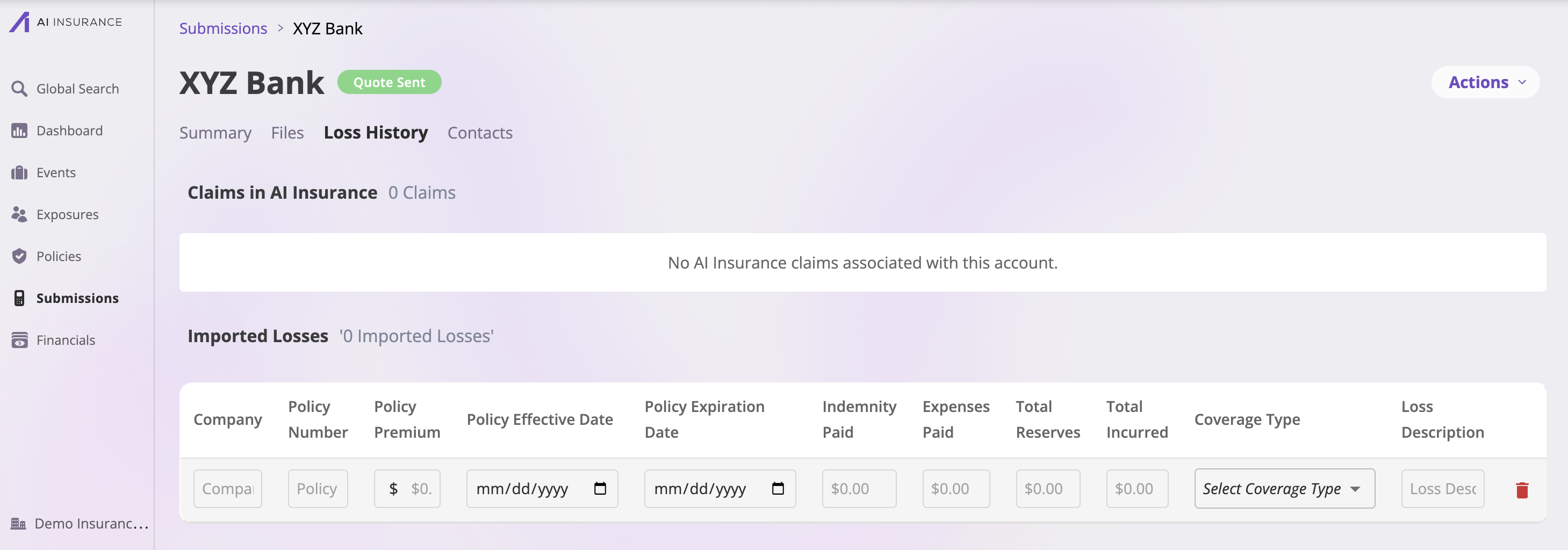
1. **Historical Losses**
* **Purpose**: Provides the historical loss input data used in the calculation
* **Location**: Submission's **Loss History Tab** — Navigate to the submission and open the Loss History Tab to input or update historical loss data
#### Data Sources
The Loss Pick calculation draws from three inputs:
1. **Historical Losses**
* **Purpose**: Provides the historical loss input data used in the calculation
* **Location**: Submission's **Loss History Tab** — Navigate to the submission and open the Loss History Tab to input or update historical loss data
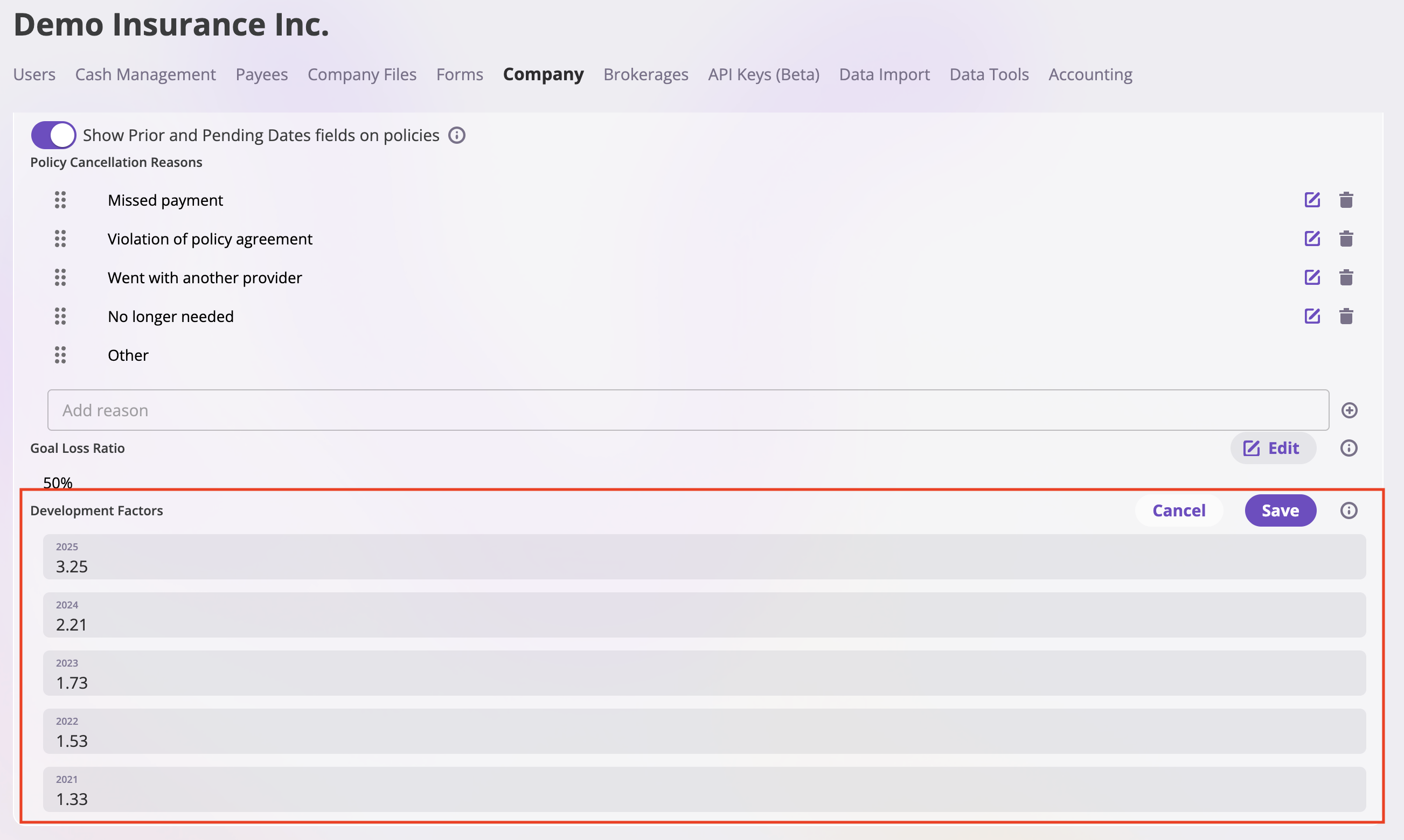
 2. **Development Factors**
* **Purpose**: Adjusts each loss record upward to account for losses that may not yet be fully developed (IBNR — Incurred But Not Reported)
* **Location**: **Company Settings** → **Underwriting / Rating Configuration** — Set your development factors here
2. **Development Factors**
* **Purpose**: Adjusts each loss record upward to account for losses that may not yet be fully developed (IBNR — Incurred But Not Reported)
* **Location**: **Company Settings** → **Underwriting / Rating Configuration** — Set your development factors here
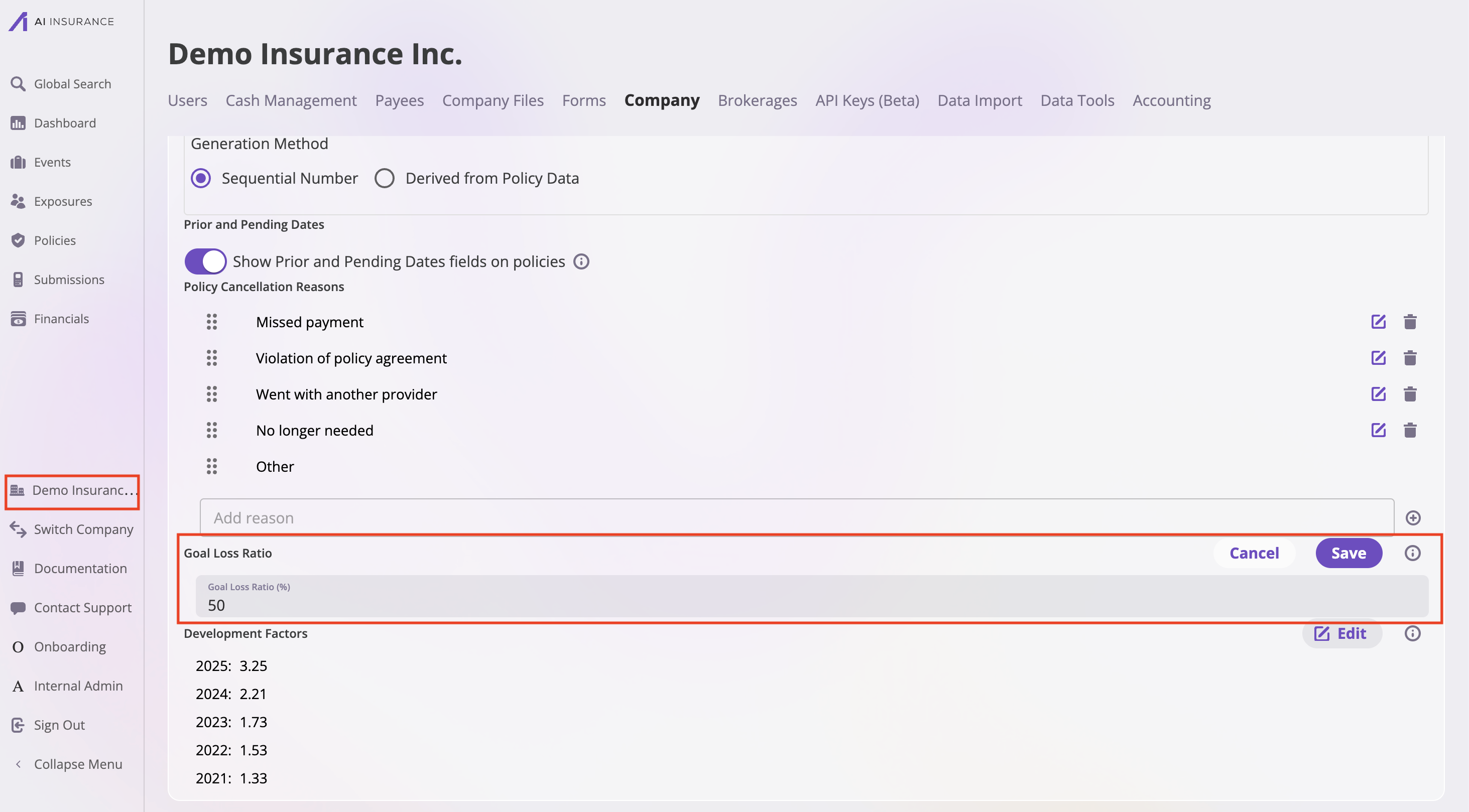
 3. **Goal Loss Ratio**
* **Purpose**: Target ratio for loss vs. premium (e.g., 50% Loss Ratio) used to calculate the projected premium
* **Location**: **Company Settings** → **Underwriting / Rating Configuration** — Set your goal loss ratio here
3. **Goal Loss Ratio**
* **Purpose**: Target ratio for loss vs. premium (e.g., 50% Loss Ratio) used to calculate the projected premium
* **Location**: **Company Settings** → **Underwriting / Rating Configuration** — Set your goal loss ratio here
 #### How Average Annual Losses Is Calculated
The **Average Annual Losses** figure is computed per loss record in three steps:
**Step 1 — Filter by time window**
Depending on the toggle selection, only losses within the relevant window are included:
* **Last 5 Years**: includes records whose loss date (event date or policy effective date) falls within the five anniversary-year windows before the quote start date.
* **All**: includes all records prior to the quote start date.
Year windows are anniversary-based from the quote start date, not calendar years. For example, with a June 16, 2025 start date:
* Year 1: June 16, 2024 – June 15, 2025
* Year 2: June 16, 2023 – June 15, 2024
* Year 3: June 16, 2022 – June 15, 2023
* (and so on)
**Step 2 — Compute an adjusted loss for each record**
For each loss record within the window:
1. Assign it to a year (1–5+) based on which anniversary window its loss date falls into.
2. Apply the corresponding **development factor** to project the ultimate loss:
```
Ultimate Loss = Total Incurred × Development Factor
```
3. Subtract the **per-claim deductible** (multiplied by the number of claims on the record) to get the adjusted loss:
```
Total Deductible = Deductible × Number of Claims
Adjusted Loss = max(0, Ultimate Loss − Total Deductible)
```
If no deductible is configured for the coverage type, this step has no effect. If `Number of Claims` is not recorded on the loss, it defaults to 1.
For losses in year 5 or older, the year-5 development factor is applied.
**Step 3 — Average the adjusted losses**
```
Average Annual Losses = Sum of Adjusted Losses / Count of Year Windows
```
This is a **mean across year windows**, not across individual loss records. Each anniversary-year window in the selected time range contributes equally to the average, regardless of how many claims occurred in that year. Years with no losses count as zero and are included in the denominator.
**Loss Pick**
The **Projected Premium** shown alongside the average is derived directly from it:
```
Projected Premium = Average Annual Losses / Goal Loss Ratio
```
### 2. Rating Stats
Displays real-time underwriting statistics.
#### How Average Annual Losses Is Calculated
The **Average Annual Losses** figure is computed per loss record in three steps:
**Step 1 — Filter by time window**
Depending on the toggle selection, only losses within the relevant window are included:
* **Last 5 Years**: includes records whose loss date (event date or policy effective date) falls within the five anniversary-year windows before the quote start date.
* **All**: includes all records prior to the quote start date.
Year windows are anniversary-based from the quote start date, not calendar years. For example, with a June 16, 2025 start date:
* Year 1: June 16, 2024 – June 15, 2025
* Year 2: June 16, 2023 – June 15, 2024
* Year 3: June 16, 2022 – June 15, 2023
* (and so on)
**Step 2 — Compute an adjusted loss for each record**
For each loss record within the window:
1. Assign it to a year (1–5+) based on which anniversary window its loss date falls into.
2. Apply the corresponding **development factor** to project the ultimate loss:
```
Ultimate Loss = Total Incurred × Development Factor
```
3. Subtract the **per-claim deductible** (multiplied by the number of claims on the record) to get the adjusted loss:
```
Total Deductible = Deductible × Number of Claims
Adjusted Loss = max(0, Ultimate Loss − Total Deductible)
```
If no deductible is configured for the coverage type, this step has no effect. If `Number of Claims` is not recorded on the loss, it defaults to 1.
For losses in year 5 or older, the year-5 development factor is applied.
**Step 3 — Average the adjusted losses**
```
Average Annual Losses = Sum of Adjusted Losses / Count of Year Windows
```
This is a **mean across year windows**, not across individual loss records. Each anniversary-year window in the selected time range contributes equally to the average, regardless of how many claims occurred in that year. Years with no losses count as zero and are included in the denominator.
**Loss Pick**
The **Projected Premium** shown alongside the average is derived directly from it:
```
Projected Premium = Average Annual Losses / Goal Loss Ratio
```
### 2. Rating Stats
Displays real-time underwriting statistics.
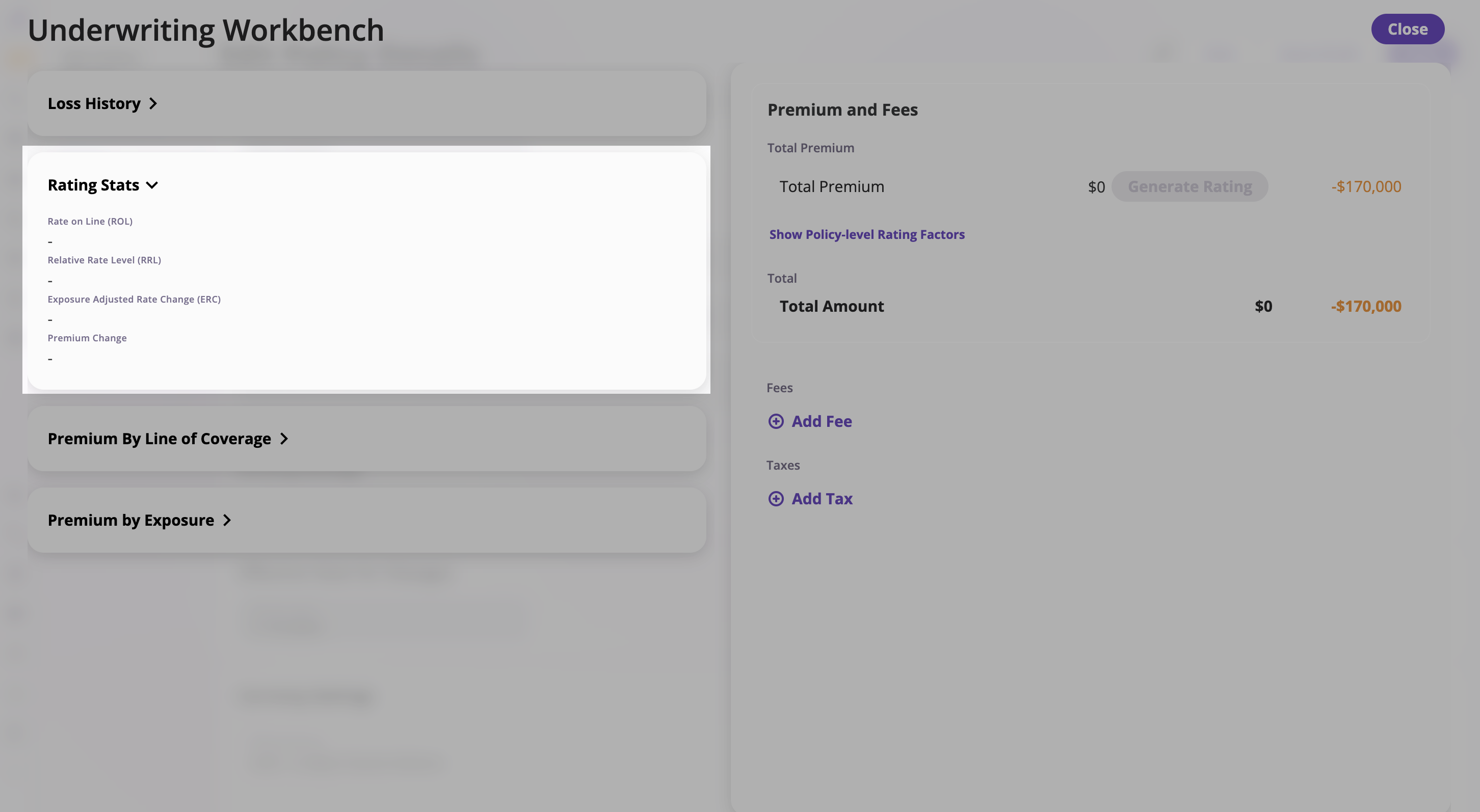 To customize which stats appear here, contact support at **[support@aiinsurance.io](mailto:support@aiinsurance.io)**.
### 3. Premium by Line of Coverage
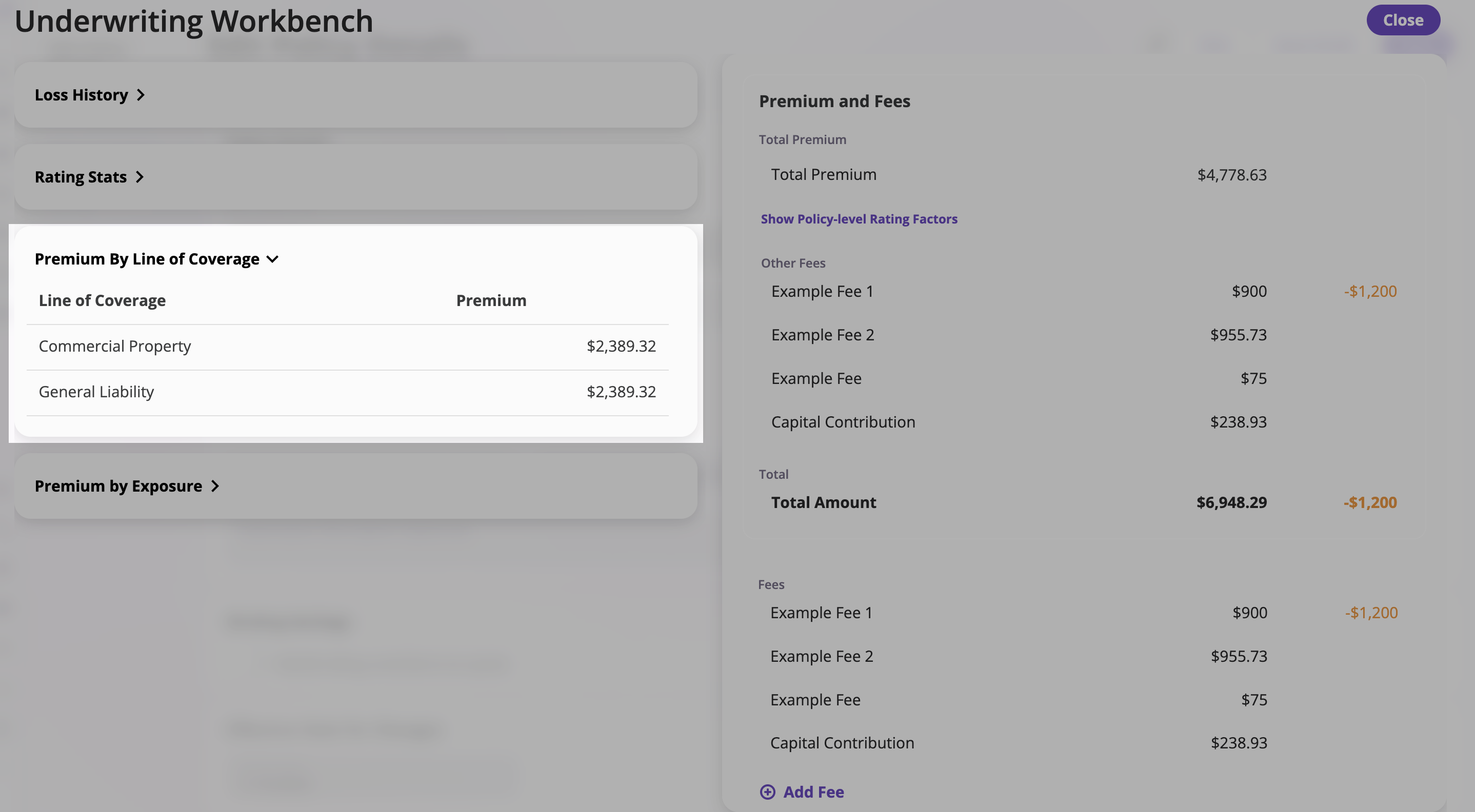
Breaks down premiums by coverage type.
| **Line of Coverage** | **Premium** |
| ------------------------------------------------------------------------------------------------------------------------------------------------------------------------------------------------------------------------------------------------------------------------------------------------------------------------------------------------------------------------------------------------------------------------------------------------------------------------------------------------------------------------------------------------------------------------------------------------------------------------------------------------------------------------------------------------------------------------------------------------------------------------------------------------------------------------------------------------------------------------------------------------------------------------------------------------------------------------------------------------------------------------------------------------------------------------------------------------------------------------------------------------------------------------------------------------------------------------------------------------------------------------------------------------------------------------------------------------------------------------------------------------------------------------------------------------------------------------------------------------------------------------------------------------------------------------------------------------------------------------------------------------------------------------------------------------------------------------------------------------------------------------------------------------------------------- | ----------- |
| General Liability | \$2,389.32 |
| Commercial Property | \$2,389.32 |
|
To customize which stats appear here, contact support at **[support@aiinsurance.io](mailto:support@aiinsurance.io)**.
### 3. Premium by Line of Coverage
Breaks down premiums by coverage type.
| **Line of Coverage** | **Premium** |
| ------------------------------------------------------------------------------------------------------------------------------------------------------------------------------------------------------------------------------------------------------------------------------------------------------------------------------------------------------------------------------------------------------------------------------------------------------------------------------------------------------------------------------------------------------------------------------------------------------------------------------------------------------------------------------------------------------------------------------------------------------------------------------------------------------------------------------------------------------------------------------------------------------------------------------------------------------------------------------------------------------------------------------------------------------------------------------------------------------------------------------------------------------------------------------------------------------------------------------------------------------------------------------------------------------------------------------------------------------------------------------------------------------------------------------------------------------------------------------------------------------------------------------------------------------------------------------------------------------------------------------------------------------------------------------------------------------------------------------------------------------------------------------------------------------------------- | ----------- |
| General Liability | \$2,389.32 |
| Commercial Property | \$2,389.32 |
|  | |
### 4. Premium by Exposure
Shows premium allocation across **individual insureds** or **exposures**.
| |
### 4. Premium by Exposure
Shows premium allocation across **individual insureds** or **exposures**.
 #### Features:
* **Search & Filter** – Locate specific insureds
* **Columns** –
* *Name* – Insured or exposure
* *Premium* – Premium amount
* *Change* – Difference since last update
#### Expanding Rows
When you expand a row for a specific exposure, you can view:
* **Current Premium** – The premium amount for that exposure
* **Rating Status** – Shows if the exposure is rated or not (e.g., "Not Rated (Insured type not rated)")
* **Historical Premium** – The previous premium amount for comparison
#### Custom Adjustments
You can add custom adjustments to individual exposures:
1. **Expand the exposure row** you want to adjust
2. **Add Adjustment**:
* Enter an **Adjustment Description** to document why the adjustment is being made
* Enter the **Adjustment Amount**
* Toggle between **"%"** (percentage) or **"\$"** (dollar amount) for the adjustment calculation
3. **Save the adjustment** – The adjustment will be applied to that exposure's premium
4. **Delete adjustments** – Use the trash icon to remove any custom adjustments you've added
Custom adjustments allow you to make manual premium modifications for specific exposures outside of the standard rating calculations.
#### Managing Insured Ratings
When working with exposures in the Premium by Exposure section, you have options to:
* **Exclude insureds from re-rating** using the "Do Not Rate" option
* **Revert rating changes** for specific insureds back to their previous rating
> For detailed step-by-step instructions on how to exclude insureds from re-rating and revert rating changes, see [Managing Insured Ratings During Endorsements](/policing/policy-management/endorsing-policy/removing-insureds-from-rerating).
### 5. Premium and Fees
#### 5.1 Total Premium and Summary
Provides an overview of total premium and policy-level fees.
#### Features:
* **Search & Filter** – Locate specific insureds
* **Columns** –
* *Name* – Insured or exposure
* *Premium* – Premium amount
* *Change* – Difference since last update
#### Expanding Rows
When you expand a row for a specific exposure, you can view:
* **Current Premium** – The premium amount for that exposure
* **Rating Status** – Shows if the exposure is rated or not (e.g., "Not Rated (Insured type not rated)")
* **Historical Premium** – The previous premium amount for comparison
#### Custom Adjustments
You can add custom adjustments to individual exposures:
1. **Expand the exposure row** you want to adjust
2. **Add Adjustment**:
* Enter an **Adjustment Description** to document why the adjustment is being made
* Enter the **Adjustment Amount**
* Toggle between **"%"** (percentage) or **"\$"** (dollar amount) for the adjustment calculation
3. **Save the adjustment** – The adjustment will be applied to that exposure's premium
4. **Delete adjustments** – Use the trash icon to remove any custom adjustments you've added
Custom adjustments allow you to make manual premium modifications for specific exposures outside of the standard rating calculations.
#### Managing Insured Ratings
When working with exposures in the Premium by Exposure section, you have options to:
* **Exclude insureds from re-rating** using the "Do Not Rate" option
* **Revert rating changes** for specific insureds back to their previous rating
> For detailed step-by-step instructions on how to exclude insureds from re-rating and revert rating changes, see [Managing Insured Ratings During Endorsements](/policing/policy-management/endorsing-policy/removing-insureds-from-rerating).
### 5. Premium and Fees
#### 5.1 Total Premium and Summary
Provides an overview of total premium and policy-level fees.
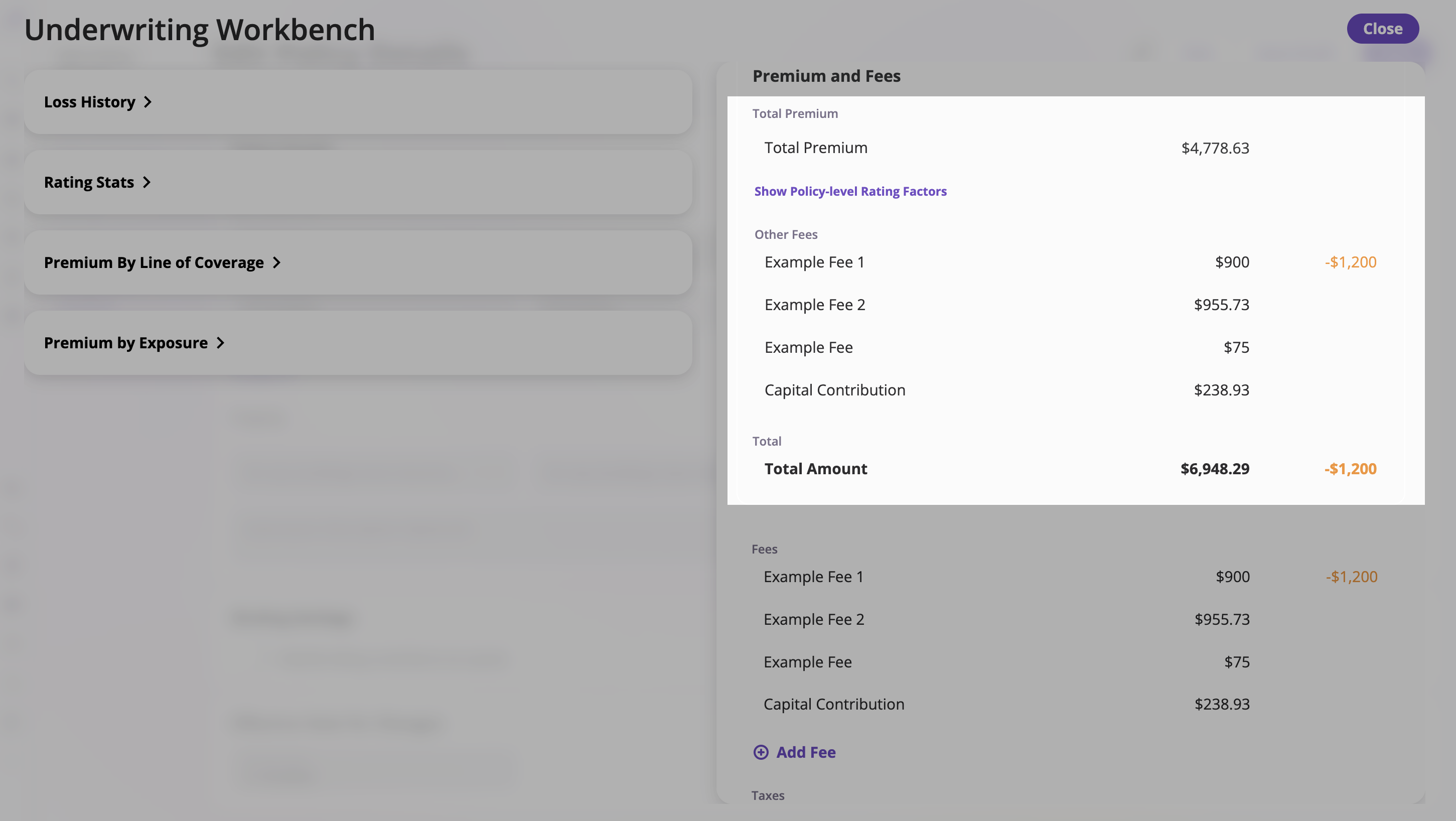 **Includes:**
* **Total Premium** – Displays the total calculated premium for the policy.
* **Policy-Level Rating Factors** – Click **Show Policy-level Rating Factors** to view rating variables applied at the policy level.
* **Other Fees** – Lists non-premium charges applied to the policy such as:
* Example Fee 1
* Example Fee 2
* Example Fee
* Capital Contribution
* **Total Amount** – The combined total of premium and all fees.
Example:
* Total Premium: \$4,778.63
* Example Fee 1: \$900
* Example Fee 2: \$955.73
* Example Fee: \$75
* Capital Contribution: \$238.93
* **Total Amount: \$6,948.29**
#### 5.2 Managing Fees
Allows users to view, add, and edit fees associated with the policy.
**Includes:**
* **Total Premium** – Displays the total calculated premium for the policy.
* **Policy-Level Rating Factors** – Click **Show Policy-level Rating Factors** to view rating variables applied at the policy level.
* **Other Fees** – Lists non-premium charges applied to the policy such as:
* Example Fee 1
* Example Fee 2
* Example Fee
* Capital Contribution
* **Total Amount** – The combined total of premium and all fees.
Example:
* Total Premium: \$4,778.63
* Example Fee 1: \$900
* Example Fee 2: \$955.73
* Example Fee: \$75
* Capital Contribution: \$238.93
* **Total Amount: \$6,948.29**
#### 5.2 Managing Fees
Allows users to view, add, and edit fees associated with the policy.
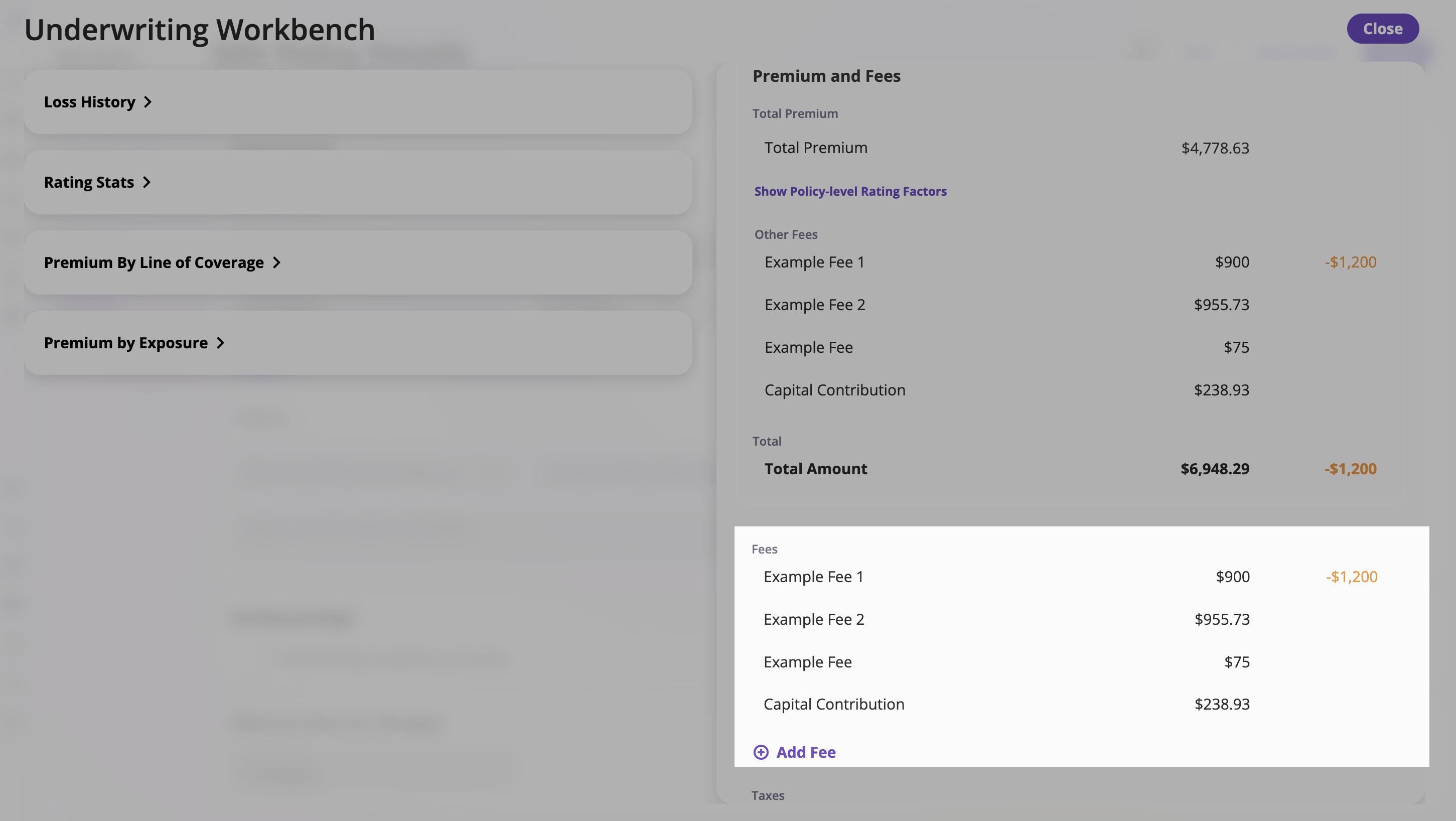 **Features:**
* **View Existing Fees** – Displays a list of applied fees.
* **Add Fee** – Click **+ Add Fee** to open a form where you can specify the fee name and amount.
* **Edit or Remove Fees** – Modify or delete existing fee entries.
Example:
* Example Fee 1 — \$900
* Example Fee 2 — \$955.73
* Example Fee — \$75
* Capital Contribution — \$238.93
* \[+ Add Fee] button at the bottom.
#### 5.3 Taxes
Displays all applied taxes, which are shown separately from premiums and fees.
**Features:**
* **View Existing Fees** – Displays a list of applied fees.
* **Add Fee** – Click **+ Add Fee** to open a form where you can specify the fee name and amount.
* **Edit or Remove Fees** – Modify or delete existing fee entries.
Example:
* Example Fee 1 — \$900
* Example Fee 2 — \$955.73
* Example Fee — \$75
* Capital Contribution — \$238.93
* \[+ Add Fee] button at the bottom.
#### 5.3 Taxes
Displays all applied taxes, which are shown separately from premiums and fees.
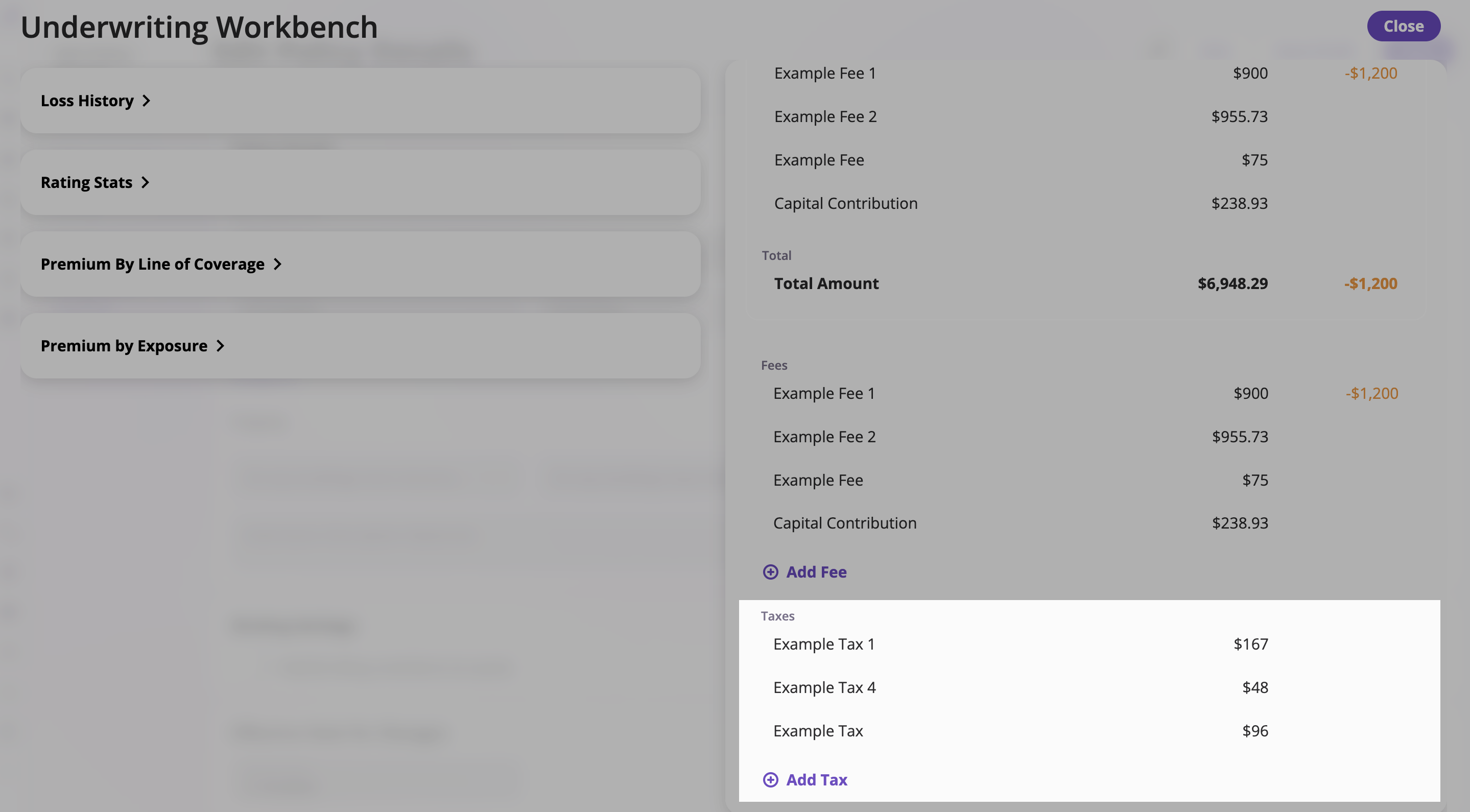 **Includes:**
* **Existing Taxes** – Each tax entry shows name and amount.
* **Add Tax** – Click **+ Add Tax** to input a new tax description and amount.
* **Save / Cancel** – Use buttons to confirm or discard changes.
Example:
* Example Tax 1 — \$167
* Example Tax 4 — \$48
* Example Tax — \$96
* Input fields for "Tax Description" and "Amount," with **Save** and **Cancel** buttons.
**Includes:**
* **Existing Taxes** – Each tax entry shows name and amount.
* **Add Tax** – Click **+ Add Tax** to input a new tax description and amount.
* **Save / Cancel** – Use buttons to confirm or discard changes.
Example:
* Example Tax 1 — \$167
* Example Tax 4 — \$48
* Example Tax — \$96
* Input fields for "Tax Description" and "Amount," with **Save** and **Cancel** buttons.